AI Product Design Canvas – a framework for designing the user side of AI products
A practical framework for designing UX in AI-powered products
In almost every project involving AI, we've seen a similar moment.
The team starts talking about what the model can do. Someone tests prompts. Someone imagines the output. Someone sketches the first version of the interface. It feels like progress, because the product quickly starts to look real. The experience is often being designed before the team has fully understood what AI is supposed to do in the first place.
What is the user trying to achieve? Where does AI genuinely help? Where should the user stay in control? What needs to be explained before the output can be trusted? And how will the product behave when the model gets something wrong?
These questions shape AI products from the inside. They are part of the core, before the interface is set.
That is why we created the AI Product Design Canvas, a practical framework for designing user experience in AI-powered products and features. It helps product teams explore when and how AI adds real value, starting with the user's problem as the foundation for everything else.
The goal is simple: to design AI experiences where the model has a clear, useful and understandable role in the product.
Why we built it
As a UX/UI studio, we work on digital products at different stages: early ideas, redesigns, complex systems and enterprise-scale tools. Over time, more and more of these conversations started to include AI.
Teams were curious, motivated and ready to experiment. The problem was that the conversation often jumped too quickly into model selection, prompt design or interface ideas, while the product role of AI was still vague.
We needed a tool that would help us slow the conversation down just enough to ask better questions.
What is the user trying to do? What is difficult about it today? What changes because AI is involved? Is AI really the right solution here? How should the user interact with it? What should remain transparent, editable or reversible?
Most canvases we found were useful in adjacent places. Some were too strategic, focused on business opportunity and transformation. Others were too narrow, focused on prompts, models or technical implementation. We needed something that could sit between product thinking and AI capability.
So we built our own.

What the canvas is for
The AI Product Design Canvas is a thinking framework. It helps teams define what AI should do, how it should behave and why it matters before they move into detailed design or development.
It works best early in the product process, when the idea is still flexible and the opportunity still needs to be clarified. At that stage, a team can still decide whether AI belongs in the experience at all, what kind of value it should bring and what kind of control the user should keep.
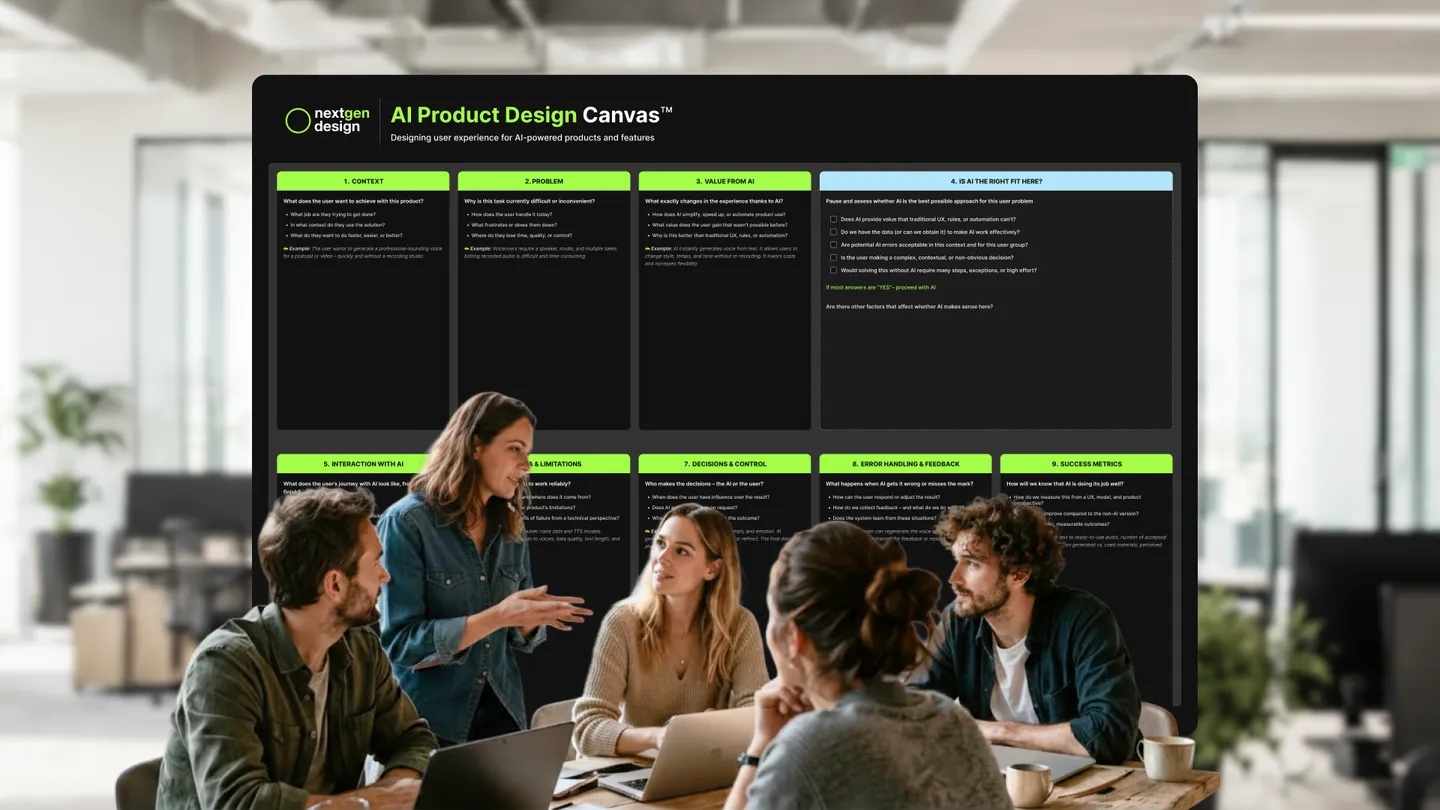
The canvas includes nine fields and one important checkpoint: is AI actually the right solution for this problem?
That checkpoint matters. AI can be impressive, and it is not always the best answer. Sometimes a clearer flow, better rules, automation or a simpler product decision will create more value with less risk.
When AI does make sense, the canvas helps the team describe the experience more precisely: the user's context, the problem, the value from AI, the interaction, data and limitations, decisions and control, error handling, feedback and success metrics.
It is simple enough to sketch out in a short session, and detailed enough to structure a deeper discovery workshop.
How it works in practice
Imagine a product like an AI-powered voice generation tool.
Before designing the interface, the team needs to understand the user's context. A creator may want to generate a professional-sounding voice for a podcast, video or presentation without booking a studio, recording multiple takes or editing audio manually.
Behind the surface, the problem is that producing good voiceovers is slow, expensive and hard to change once recorded.
Only then does the value from AI become clear. AI can generate speech from text, make it easier to test different voices, adjust tone or tempo and create usable audio much faster than a traditional recording workflow.
The product work continues from there.
The team needs to decide how the interaction should feel. What does the user enter? What do they choose? How is the result presented? Can they refine it? Can they regenerate it? What happens if the voice sounds wrong, unnatural or not aligned with the intended tone?
There are also questions about data and limitations. Voice quality, language support, text length, rights to voices and model reliability all shape the experience. They cannot stay hidden behind the interface.
The same applies to control. The user may choose the voice, tempo and emotional tone, while AI generates the result. The final decision stays with the user: accept, adjust, regenerate or reject.
And finally, the team needs to define what success means, both from a technical and from a product and UX perspective. How quickly can the user get from text to usable audio? How often is the first result good enough? How much editing is needed? Does the output help the user complete the task with less effort and more confidence?
Used this way, the canvas becomes more than a checklist. It becomes a shared space for product, design and technical teams to understand what they are actually building.
Why this matters for UX
AI changes the experience in ways that are easy to underestimate.
A traditional interface usually follows a more predictable logic. The user selects, clicks, edits, saves, confirms. With AI, the product often returns something generated, inferred or recommended. The result may be useful, partially right, surprising or wrong in a way that still looks convincing.
That means UX has to account for trust, control and recovery from the beginning.
The user needs to know what AI is doing, what it used, what can be changed and who is responsible for the final outcome. The product needs to make uncertainty manageable, without turning every interaction into a warning label.
This is where many AI features become fragile. They work well in a demo, then become harder to use when the user needs to repeat the task, correct the result, compare outputs or rely on the product in a real workflow.
The canvas helps teams talk about those situations before the interface is already fixed.
Who it is for
The AI Product Design Canvas is built for cross-functional teams working at the intersection of design, product and AI.
Product designers can use it to understand how AI affects the user experience before screens are designed. Product managers can use it to shape clearer decisions and align the team before development begins. AI and tech leads can use it to connect model decisions with real user needs and product context.
It is useful when a team is exploring an AI-first product idea, adding an AI-powered feature to an existing solution, running a discovery or scoping workshop, or simply trying to stress-test an idea before committing to implementation.
It is meant to make the right questions visible early enough to influence the product, before the team locks in a perfect answer.
A practical starting point
We created the AI Product Design Canvas to help us design better products with AI. We are sharing it because the same questions keep appearing in many teams, products and organizations.
AI product design should start with a user, a task, a context and a clear reason why AI is the right way to help. The model looking for a use case comes later, if at all.
The canvas gives teams a practical way to have that conversation before the work becomes too expensive to rethink.
It is free to use, available in English and Polish, and does not require an email.
Download AI Product Design Canvas
Free to use – no email required